AI Video Resolution Guide: 480p vs 720p vs 1080p
Resolution might seem like a simple choice—higher is always better, right? Not quite. When generating AI videos, resolution is a critical decision that affects generation time, cost, visual quality, and platform compatibility. Choosing wrong can waste time and money.
In this comprehensive guide, I'll break down the real differences between 480p, 720p, and 1080p for AI video generation. By the end, you'll know exactly which resolution to choose for every situation, saving time and maximizing quality where it matters.
Understanding Video Resolution
Resolution refers to the number of pixels in your video. More pixels mean more detail, sharper images, and larger file sizes. Here's what the numbers actually mean:
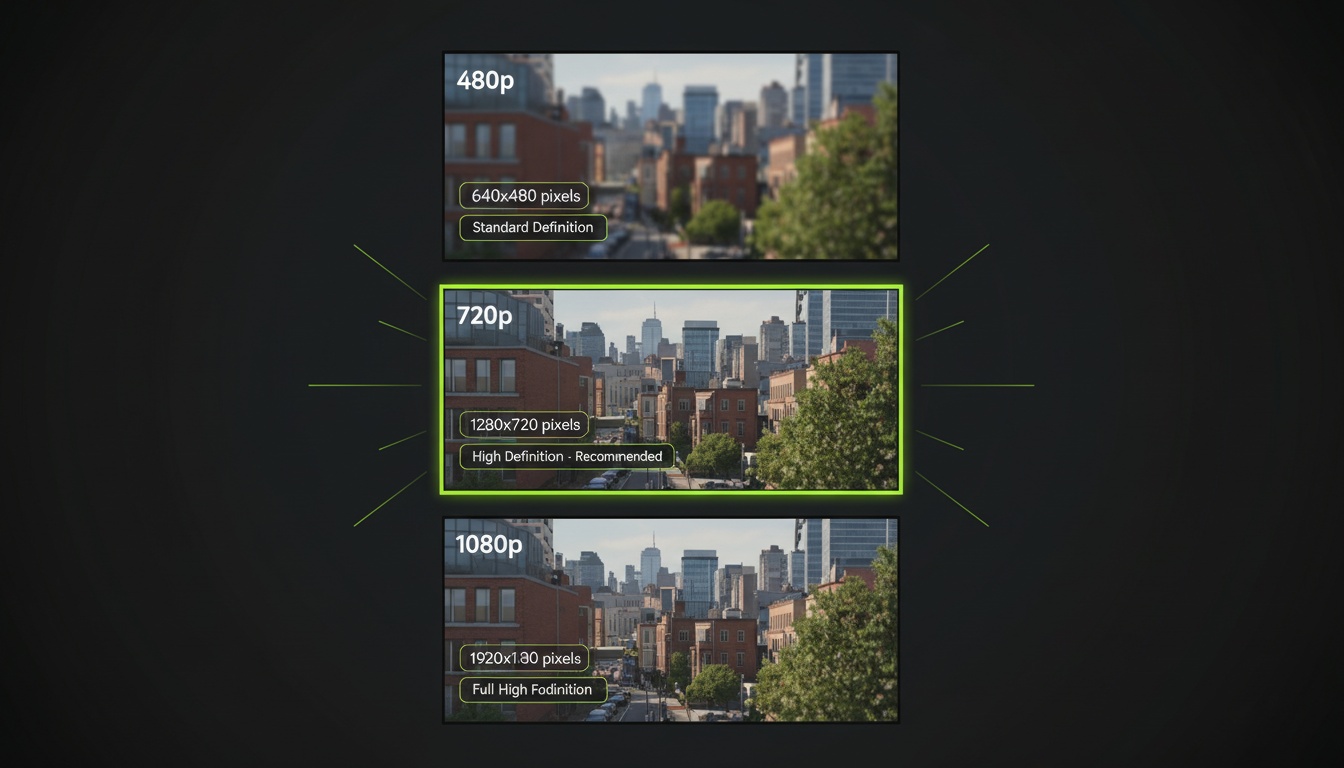
- •480p = 854 x 480 pixels (roughly 400,000 total pixels)
- •720p = 1280 x 720 pixels (roughly 920,000 total pixels)
- •1080p = 1920 x 1080 pixels (roughly 2 million total pixels)
That means 1080p has 5x more pixels than 480p and over 2x more than 720p. Each of those pixels must be generated by the AI model, which is why higher resolution takes longer and often costs more.
For AI video generation specifically, resolution affects not just clarity but also how the model interprets and renders details. Higher resolution gives the AI more "canvas" to work with, potentially creating more nuanced results.
480p: When Speed Matters Most
480p is the fastest, cheapest option—but that doesn't make it low quality. Here's when 480p makes sense:
Advantages of 480p:
- •Fastest generation: Often 50-70% faster than 1080p
- •Lower cost: Typically half the credit cost of higher resolutions
- •Quick iteration: Perfect for testing ideas and experimenting
- •Smaller files: Faster uploads and less storage space
- •Good enough for small screen viewing
Best use cases for 480p:
- •Testing prompts and effects before final generation
- •Draft content where quality isn't final priority
- •Videos that will only be viewed on mobile screens
- •High-volume content creation where speed beats perfection
- •Personal use or casual sharing
Limitations of 480p:
On larger screens or when viewed full-screen, 480p shows its limitations. Fine details become blurry, text can be hard to read, and the overall impression is less professional. For brand content or important projects, 480p usually isn't enough.
Test at 480p, Publish at 1080p
Videz lets you iterate quickly at lower resolutions, then generate final versions at higher quality.
Try Videz Free720p: The Sweet Spot
720p hits the optimal balance for most AI video creators. It's HD quality that looks professional without the time and cost penalties of 1080p.
Advantages of 720p:
- •HD quality: Sharp, professional-looking results
- •Reasonable generation time: 20-40% faster than 1080p
- •Platform native: Instagram, TikTok display at 720p anyway
- •Cost effective: Best quality-per-credit ratio
- •Versatile: Works well across all platforms and screen sizes
Best use cases for 720p:
- •Instagram Reels and TikTok (perfect match for platform specs)
- •YouTube Shorts (looks great, uploads faster)
- •Social media content across all platforms
- •Professional content creation on a timeline
- •Most commercial and marketing videos
Why 720p is ideal for social media:
Here's the secret most creators don't know: Instagram compresses videos to 720p during upload anyway. TikTok does similar compression. Generating at 1080p for these platforms literally wastes time and money—the platforms downscale it.
720p also loads faster on mobile data, leading to better completion rates and engagement. Viewers don't wait for videos to buffer, they just scroll past.
1080p: Maximum Quality
1080p is Full HD—the highest resolution most AI video generators support. It's premium quality but comes with trade-offs.
Advantages of 1080p:
- •Maximum detail: Sharpest, most detailed results
- •Professional grade: Meets broadcast and commercial standards
- •Future-proof: Won't need re-generation if quality standards increase
- •Large screen friendly: Looks great on TVs and monitors
- •Best AI inference: More pixels give AI more detail to work with
Best use cases for 1080p:
- •Professional marketing and advertising campaigns
- •YouTube main channel content (not Shorts)
- •Hero content that represents your brand
- •Video content for websites and large displays
- •Archival or portfolio pieces you'll use long-term
When 1080p matters most:
If your video will be viewed on large screens, embedded on websites where quality matters, or represents your brand in high-stakes contexts, 1080p is worth the investment. The visible quality difference between 720p and 1080p increases dramatically as screen size increases.
Generation Time Comparison
Let's talk real numbers. Here's approximate generation time for a 5-second video across resolutions:
- •480p: 30-45 seconds generation time
- •720p: 45-75 seconds generation time
- •1080p: 75-120 seconds generation time
These times add up fast. Creating 10 videos at 1080p might take 15-20 minutes, while the same videos at 720p take 8-12 minutes. For high-volume creators, this difference is significant.
The inference process for AI video generation is computationally intensive. Each pixel needs to be calculated based on your prompt and source image. More pixels = more computation = more time.
Optimized Generation Speed
Videz uses optimized AI models for fastest generation at every resolution without sacrificing quality.
Get Videz NowCost Considerations
Resolution directly impacts cost in most AI video platforms. Understanding the cost-to-quality ratio helps you make smart budget decisions:
- •480p: Lowest cost, great for testing
- •720p: Medium cost, best value for quality received
- •1080p: Highest cost, worth it for important content
Smart creators use a tiered strategy: generate multiple versions at 480p to test, pick the best, then create final version at 720p or 1080p. This minimizes wasted spending on high-resolution experiments that don't work out.
Platform-Specific Recommendations
Different platforms have different ideal resolutions. Here's my platform-by-platform guide:
Instagram Reels:
720p is perfect. Instagram compresses to 720p anyway, and mobile screens don't show the 1080p difference. Save your time and money—720p looks identical to 1080p on Instagram.
TikTok:
720p again. TikTok's compression is aggressive, and most viewing happens on phones. Higher resolution provides zero benefit to viewers.
YouTube Shorts:
720p minimum, but 1080p if your content is evergreen. YouTube Shorts can surface months later, and higher quality content performs better in YouTube's algorithm over time.
YouTube Main Feed:
1080p mandatory for professional channels. Desktop viewing means quality differences are visible, and YouTube rewards higher quality content with better rankings.
LinkedIn:
720p is sufficient. Professional context demands quality, but mobile viewing dominates LinkedIn's platform.
Website Embeds:
1080p recommended. Website videos often display large, and quality represents your brand. Slow loading is less critical when the video is embedded, not scrolled past in a feed.
File Size and Upload Considerations
Resolution affects file size, which impacts upload speed and platform limits:
- •480p 5-second video: ~3-5 MB
- •720p 5-second video: ~8-12 MB
- •1080p 5-second video: ~15-25 MB
On slow internet connections, uploading 1080p videos becomes frustrating. If you're creating content while traveling or on mobile data, 720p uploads significantly faster without noticeable quality loss on social platforms.
My Resolution Decision Framework
Here's the simple decision tree I use for every AI video I create:
- •Testing/Experimenting? → 480p
- •Instagram/TikTok/Social? → 720p
- •YouTube Shorts casual? → 720p
- •YouTube main content? → 1080p
- •Client/Brand work? → 1080p
- •Personal archival? → 1080p
- •Quick iteration needed? → 480p first, then upscale winner
This framework saves me time and money while ensuring quality where it matters. Default to 720p unless you have specific reasons to go higher or lower.
Start Choosing Resolution Strategically
Resolution isn't just a technical setting—it's a strategic decision that affects your workflow, budget, and results. Understanding when to use which resolution makes you a smarter, more efficient creator.
The golden rule: choose the minimum resolution that achieves your quality goals for the specific platform. Higher isn't always better when the platform compresses it anyway or viewers watch on phones.
Flexible Resolution for Every Use Case
Videz supports 480p, 720p, and 1080p generation. Test fast at low res, publish perfect at high res. Full control over quality and speed trade-offs.
Download VidezFounder & GenAI Expert
Founder of Videz and generative AI expert with extensive experience building AI-powered products.
Related Articles

AI Video Prompts: 20+ Examples That Actually Work
Copy-and-paste AI video prompts that generate stunning results. Learn what makes effective prompts and get inspired by real examples across different styles.
AI Videos for TikTok: Complete Creator's Guide to Viral Content
Learn how to create engaging TikTok videos using AI video generators. Master effects, trends, and optimization techniques to boost your TikTok presence.
How to Choose the Right AI Video Model for Your Needs
Compare AI video generation models and learn which one works best for your projects. Understand model capabilities, trade-offs, and when to use each type.